

A word count answers a different question from a character count. An essay may have a word limit, while a form field may have a character limit that includes spaces. Accurate counting starts by identifying what the destination measures, selecting the right text, and using a consistent convention. A number is only useful when you understand what it includes.
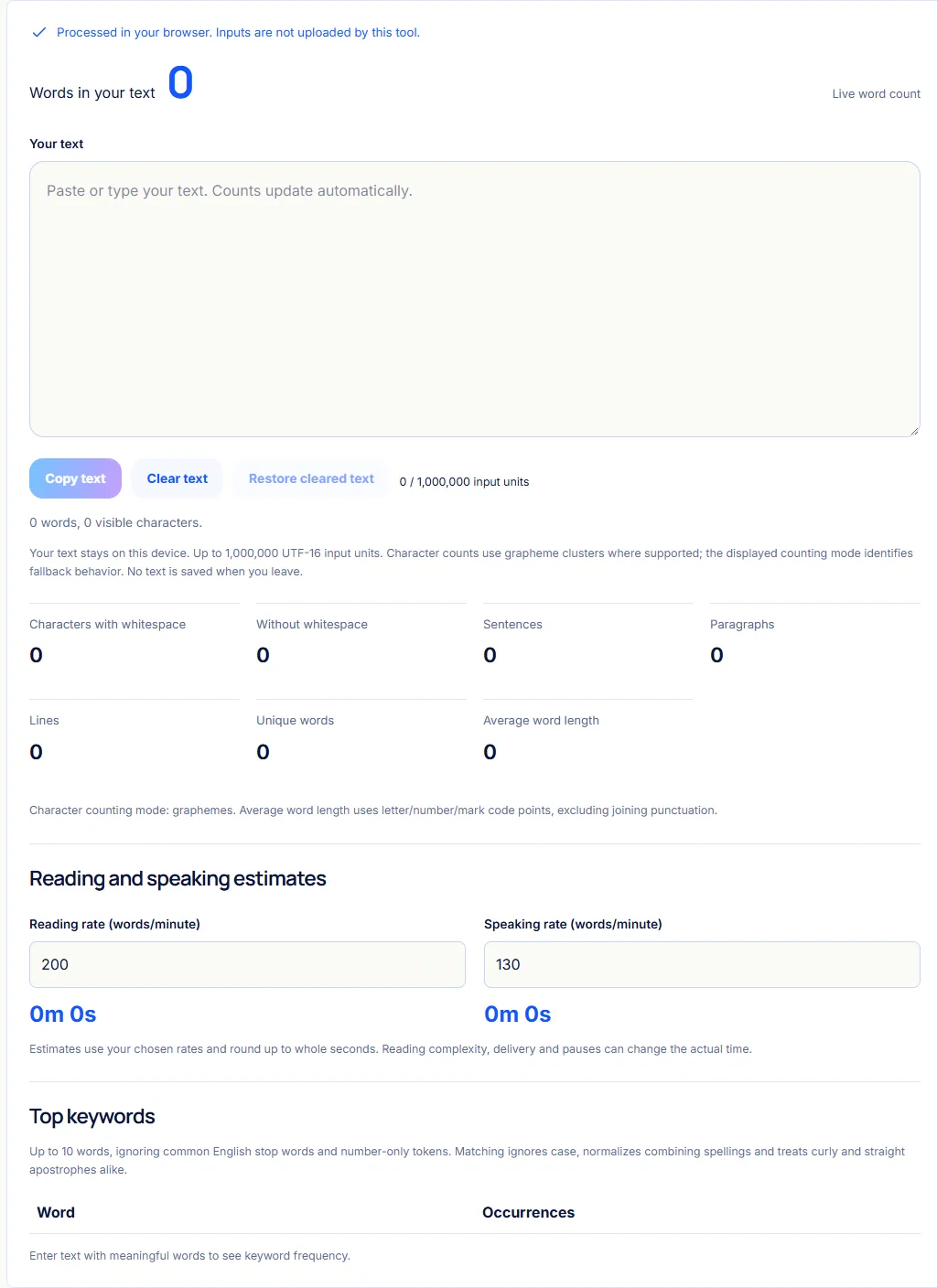
The Utilizeio Word Counter displays words, visible characters, characters without whitespace, Unicode code points and UTF-16 units. It also provides estimated sentence and paragraph totals. This guide explains those distinctions so you can compare counts sensibly rather than assuming every application must return the same result.
What is a word counter?
A word counter identifies text units according to a rule and totals them. Some applications count whitespace-separated chunks; others use punctuation or language-specific boundaries. Those approaches can disagree even when neither application has lost any text. The important question is which convention your school, editor, client or submission system requires.
Utilizeio recognises runs of Unicode letters and numbers, allowing internal apostrophes and several hyphen forms between word parts. A contraction such as don't and a connected term such as re-enter each count as one word. Numbers can count as words. Punctuation by itself is not a word. This is a documented text rule, not a universal linguistic definition.
How to count words online
- Identify the exact passage whose count matters. Decide whether headings, references, captions and notes belong in it.
- Open the Word Counter and paste or type the passage into the editor.
- Read the word total, then compare the visible-character and no-whitespace totals if the destination has a length limit.
- Inspect the sentence and paragraph figures as useful estimates, not as grammar analysis.
- Edit your text and review the updated totals. Keep the final text in your own document before closing the page.
- If the receiving system provides a counter, check the same final passage there before submitting.
For a character-first task, the Character Counter highlights character totals and an optional target length. A target warns you when a limit is exceeded; it does not automatically cut off or delete the text. This lets you decide what to shorten.
Words versus characters
A word groups letters or numbers into a unit; a character measure counts smaller units. Hello world! contains two words, but twelve visible characters when the space and exclamation mark are included. Removing whitespace from that character measurement leaves eleven. The punctuation still counts as a character even though it does not become a separate word.
| Sample | Utilizeio words | Visible characters, including spaces | Visible characters, excluding whitespace |
|---|---|---|---|
Hello world! |
2 | 12 | 11 |
red blue |
2 | 8 | 7 |
don't |
1 | 5 | 5 |
re-enter |
1 | 8 | 8 |
42 |
1 | 2 | 2 |
These examples use ordinary letters and ASCII punctuation, so several character conventions agree. Emoji, combining marks and some writing systems make the distinctions more visible. They are worth checking when a platform rejects text that appears to fit a displayed limit.
Characters with and without spaces
Utilizeio's no-whitespace figure excludes more than ordinary spaces: it also excludes whitespace such as tabs and line breaks. Its separate Spaces metric counts the ordinary space character. Therefore, subtracting Spaces from the visible-character total will not necessarily reproduce the no-whitespace total in a passage containing tabs or newlines.
In current browsers with Intl.Segmenter, visible characters are counted as grapheme clusters: units people usually perceive as single characters. A letter followed by a combining accent can be one visible character but two Unicode code points. A family emoji can appear as one visible symbol while containing multiple code points and UTF-16 units.
A browser without the required segmenter falls back to code-point counting and labels that mode. Check this label rather than assuming the same visible-character convention exists in every browser. If a receiving application defines its limit in UTF-16 units or bytes, use its own specification; the visible-character total is not a byte count.
Why different word counters give different results
Differences often come from the selected text or the boundary rule. One application may include a title, text box or footnote that another omits. Hyphenated words, contractions, isolated numbers and punctuation may be handled differently. Copying text can also introduce tabs or line breaks that were not obvious in the original layout.
Utilizeio does not perform dictionary-based segmentation for every language. A continuous sequence of letters without spaces, including some Chinese text, can be counted as one matching run rather than separated into linguistic words. For a language-specific submission, use the required application's convention and treat the browser total as a practical check, not an authoritative language analysis.
Sentence count is also approximate. Abbreviations and unusual punctuation can affect sentence boundaries. Paragraphs are identified using blank-line separation; a single line break is not necessarily a new paragraph by that rule. If structural totals matter, check the actual text and the destination's definition.
How to count words in Microsoft Word and Google Docs
Microsoft Word
Open your document and check the word-count indicator in the status bar. Select a passage when you need a section count, or open the Word Count dialog from the Review area for more detail. The available controls can vary by desktop or web version. Review whether supporting text such as notes is included under your required submission policy.
Word for the web describes its count as approximate; use the desktop application when the full document's count is essential. Microsoft's Word for the web documentation explains that distinction. Do not compare a whole-document total against a browser count of only the main body and conclude that one tool is inaccurate.
Google Docs
On a computer, open the document and choose Tools > Word count. Select part of the document first to count that section. The dialog provides word and character figures. Google states that the whole-document count excludes headers, footers and footnotes unless a section is selected; see its official word-count instructions.
Before comparing applications, choose the same scope in both. Check the assignment or publication policy rather than adopting the settings of whichever tool returns the more convenient number. If a submission portal performs its own validation, that portal's acceptance check is the final practical constraint.
Common use cases
For an essay, count the body and any other material your institution requires, keeping a separate record of exclusions. For a short description or form field, check whether spaces and line breaks count. For a speech, treat the reading or speaking estimate as a planning aid: pauses, technical terms and delivery style affect the actual duration.
Editors can use counts to compare draft length without treating length as a quality score. A shorter draft is not automatically clearer, and a longer draft is not automatically more complete. The best count supports a specific requirement rather than encouraging extra words solely to reach a target.
Reduce word count without losing meaning
Look first for repeated ideas, unnecessary introductions and phrases that make the same point twice. At this point in time can often become now; in order to can often become to. Keep evidence, definitions and qualifications that the reader needs. Removing them may shorten the text while making it less accurate.
For repeated phrases, Find & Replace Text can help, but inspect the output before adopting it everywhere. A phrase that is redundant in one sentence may be necessary in another. Use the Text Case Converter for formatting changes rather than expecting a counter to fix capitalization.
Tips for accurate counting
Use the final text, not an earlier draft. Select a consistent scope, verify the relevant metric, and retain intentional line breaks. After pasting into the receiving application, count again if that application changes punctuation or inserts extra content. Record your method when a reviewer might ask how the total was calculated.
Do not confuse visible characters, code points, UTF-16 units and bytes. Each can be a valid measure for a different purpose. A form that specifies only "characters" leaves an ambiguity; check its documentation or test its own counter with a small sample containing an emoji before relying on an external total.
Frequently asked questions
Do spaces count as characters?
They count in Utilizeio's main visible-character total. The no-whitespace total excludes spaces, tabs and line breaks. A receiving system may use a different convention.
Are hyphenated words counted as one word?
Utilizeio recognises supported internal hyphens between letter or number parts, so re-enter counts as one. Other applications can split it differently.
Does punctuation add to the word count?
Punctuation alone does not count as a word under this tool's rule. It normally contributes to character totals, and it can affect how neighbouring word parts are separated.
Why can one emoji use several characters in a form?
The form may count code points or UTF-16 units rather than visible grapheme clusters. A joined emoji can contain several underlying units even though you see one symbol.
Can I rely on the sentence or reading-time estimate?
Use it for planning. Sentence boundaries and speaking pace are approximations; they do not replace grammatical review or a timed reading of your actual text.
Is my pasted text sent to a server for counting?
The current tool counts in your browser. Approved analytics uses tool/action metadata and does not include your entered text or results. Save important writing separately because the tool is not document storage.
Count the measure that matters
Choose the right scope and metric, understand its convention, and verify the final passage in the receiving system. Open the Word Counter to review words and character totals together without uploading your draft.