

Changing letter case is useful when a heading arrives in capitals, a draft mixes styles, or a title needs consistent formatting. The safest approach is to convert a copy, inspect the result, and preserve deliberate spelling such as brand names and abbreviations. Capitalization can improve presentation, but it cannot decide which words are proper nouns or repair unclear writing.
This guide explains the actual behaviour of the Utilizeio Text Case Converter, including its title-case rules and limitations. It processes the text in your browser; you do not need to upload a document or create an account. The article focuses on plain text rather than preserving a word processor's fonts, headings or page layout.
What is a text case converter?
A text case converter changes the capitalization of letters in a string. For example, Welcome Back can become WELCOME BACK or welcome back. Spaces, punctuation, numbers and line breaks remain in place, although some Unicode case mappings change the number of characters. It is a formatting operation rather than a grammar check, translation service or rewriting tool.
Utilizeio offers uppercase, lowercase, sentence case, title case, capitalized case, inverse case and alternating case. These are different transformations. Title case applies a small-word rule; capitalized case simply starts each recognised word with a capital. Pick the mode that matches the destination instead of assuming they produce identical headings.
Understanding the main capitalization styles
Uppercase
Uppercase changes letters to capitals: Meeting at 10:30 becomes MEETING AT 10:30. It is useful for short labels, reference codes and headings when the relevant style requires capitals. It does not change the digits or colon. A long paragraph in capitals can be harder to scan, so use it selectively rather than applying it to every sentence.
Lowercase
Lowercase turns Meeting at 10:30 into meeting at 10:30. It can help standardise a rough draft or prepare text for another formatting step. It also changes meaningful capitals: NASA becomes nasa, and London becomes london. Review names and acronyms afterwards. Lowercase alone does not make a safe URL; that is a separate conversion with different rules.
Title case
Utilizeio lowercases the input first and capitalizes recognised words, while keeping a defined set of small words lowercase inside a line. The first word, last word and a word following a colon are capitalized. For example, the lord of the rings becomes The Lord of the Rings. Each line is treated independently.
This is a practical rule set, not an implementation of every editorial style guide. It does not automatically preserve iPhone, eBay or NASA. A publication may have different rules for conjunctions, prepositions or hyphenated headings. If you must follow a named style, compare the converted title with that style's instructions and correct it manually.
Sentence case
Sentence case lowercases the text and capitalizes the next letter at the beginning or after a period, question mark, exclamation mark or line break. HELLO. WELCOME BACK! becomes Hello. Welcome back!. Quotes before the first letter do not prevent capitalization.
The tool does not understand abbreviations, people's names or sentence meaning. A period in an abbreviation can start a new capitalization boundary, and a name in the middle of a sentence can lose its capital. Sentence case gives you a starting point; proofreading provides the context.
How to convert text case online: step by step
- Keep an original copy in your own editor before changing important text.
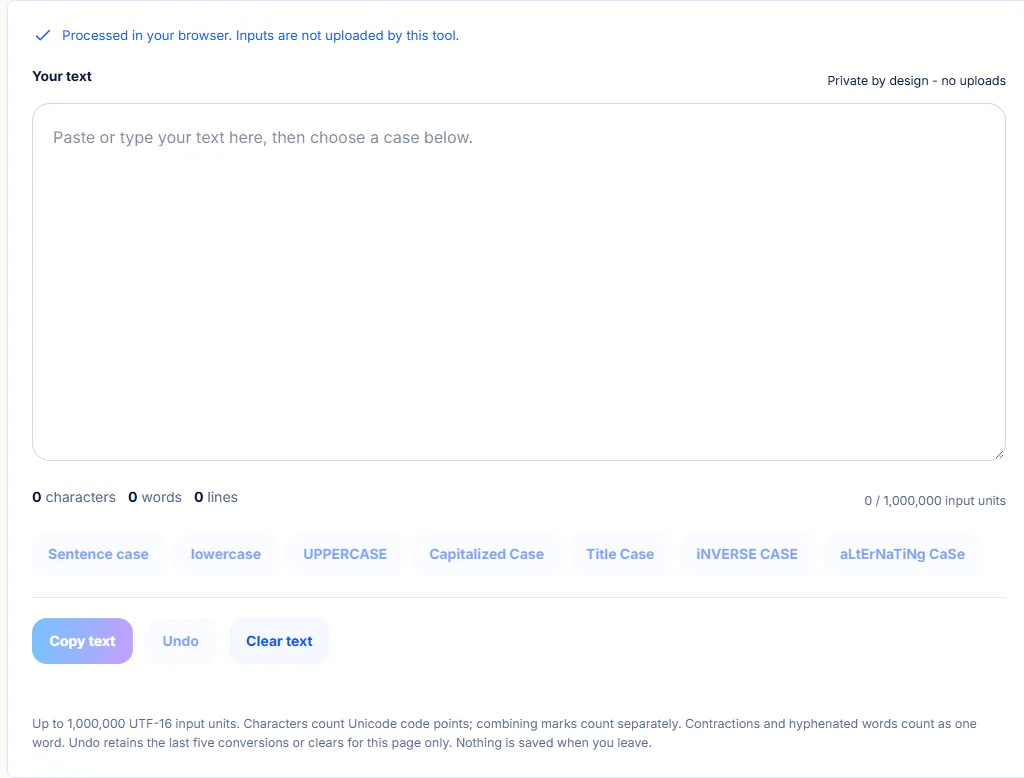
- Open the text case converter and paste or type your text into its labelled editor.
- Choose UPPERCASE, lowercase, Title Case or another available case button.
- Read the transformed text in the same editor. Check names, abbreviations and punctuation boundaries.
- Make any small corrections directly in the editor, then choose Copy text.
- Paste into the destination and check its formatting. If you need to reverse an action, use Undo while you remain on the page.
The editor keeps up to five recent conversion or clear actions for undo during that visit. It is not permanent version history and is not a substitute for saving your document. If copying is blocked by browser permissions, use the selected text with Ctrl+C on Windows or Command+C on macOS. Clipboard behaviour can vary by browser and permission settings.
Comparison table with real examples
| Mode | Input | Result |
|---|---|---|
| Uppercase | hello, world! |
HELLO, WORLD! |
| Lowercase | HELLO, WORLD! |
hello, world! |
| Sentence case | HELLO. WELCOME! |
Hello. Welcome! |
| Title case | the lord of the rings |
The Lord of the Rings |
| Capitalized case | the lord of the rings |
The Lord Of The Rings |
| Uppercase with numbers | Room 12, floor 3 |
ROOM 12, FLOOR 3 |
Try a small representative sample before processing a long passage. Include the unusual names, punctuation and non-English letters present in your real text. That check is more useful than testing only a simple English sentence and assuming every case behaves the same way.
Common uses for text case conversion
Use uppercase for a short label that must follow an existing design convention. Use lowercase to normalise a draft before applying a different style. Use title case for headings when its rules match your publication. Use sentence case to make an all-caps paragraph easier to review, followed by manual corrections to proper nouns.
A team editing repeated headings can benefit from choosing one convention in advance. Record whether headings use sentence case or title case, how acronyms appear, and which brand spellings are exceptions. Automated conversion then supports that convention rather than creating a different style in every document.
If you also have a length requirement, check the final version with the Word Counter. Do not assume case conversion always preserves character totals. For replacing a specific phrase across a draft, use Find & Replace Text instead of retyping each occurrence.
Common mistakes to avoid
The most common mistake is treating a transformed paragraph as finished copy. A sentence-case result can turn an acronym into an ordinary-looking word; title case can remove deliberate internal capitals. Keep a short list of terms that must survive unchanged, then search for each term after the conversion.
Do not paste rich text and expect the original document layout to be retained. The tool edits plain text. Fonts, tables, tracked changes and comments belong to the original application, not to the case transformation. Review the destination after pasting because its editor may apply its own formatting.
Unicode adds another reason to check the result. Uppercasing Straße produces STRASSE, so one letter expands into two. Language-specific capitalization expectations can differ from JavaScript's general Unicode mappings. The tool has no language selector and should not be described as a locale-specific Turkish or linguistic capitalization engine.
Tips for better text formatting
Start with a clean sample and choose the intended style before touching a whole document. Preserve intentional names separately, convert once, and proofread before copying. Repeatedly switching between uppercase and lowercase cannot reconstruct every original spelling because the original capitalization information has been discarded.
Check the heading in its actual context: a page title, menu label and paragraph may require different capitalization. Do not use alternating case as a substitute for readable headings. It is a stylistic transformation that usually needs a specific reason, rather than the default for professional writing.
For reusable content, make a quick review checklist: proper nouns, acronyms, product names, dates, numbers, punctuation and final character count. That short routine catches the errors an automated letter transformation cannot interpret.
Frequently asked questions
Is title case the same as capitalizing every word?
Not in Utilizeio. Capitalized case starts every recognised word with a capital. Title case keeps specified small words lowercase except at special positions, including the first and last word of a line and after a colon.
Does sentence case preserve company names and acronyms?
It does not recognise them semantically. It lowercases the input before applying sentence boundaries, so you should restore names and acronyms manually when necessary.
Can converting case change the character count?
Yes. Unicode case mappings can expand letters, as in the German sharp s becoming SS. Count the converted result if you are working to a character limit.
Does the tool change spaces, punctuation or line breaks?
The case transformation retains these characters in place. It changes letter case; it does not remove extra spaces or reorganise paragraphs.
Is my text uploaded to Utilizeio?
The current converter processes inputs locally in your browser. Its approved analytics events contain tool/action metadata, not the entered text or transformed result. Keep your own saved copy before leaving the page.
Why does my converted heading need manual correction?
Capitalization rules do not reveal which terms are proper nouns, preferred brand spellings or exceptions in your publication's style. A converter can apply a consistent rule, but editorial review supplies that missing context.
Finish with a readable result
Choose a case style, test a sample, convert a copy and review meaningful exceptions. This workflow is quick without asking an automated formatting rule to understand your whole document. Open the Text Case Converter to apply the style you need, then check the result in its final destination.